
Wskaźnik dla MetaTrader 4 i MetaTrader 5
Fibonacci diamonds
Gdy obserwujesz, czy cena wychodzi poza dotychczasowy zakres, potrzebujesz wyraźnego punktu odniesienia. Diamenty Fibonacciego pokazują kanał i strefy na wykresie oraz oznaczają sygnały w wybranym trybie. Widzisz też, z jakiego interwału pochodzi kanał.
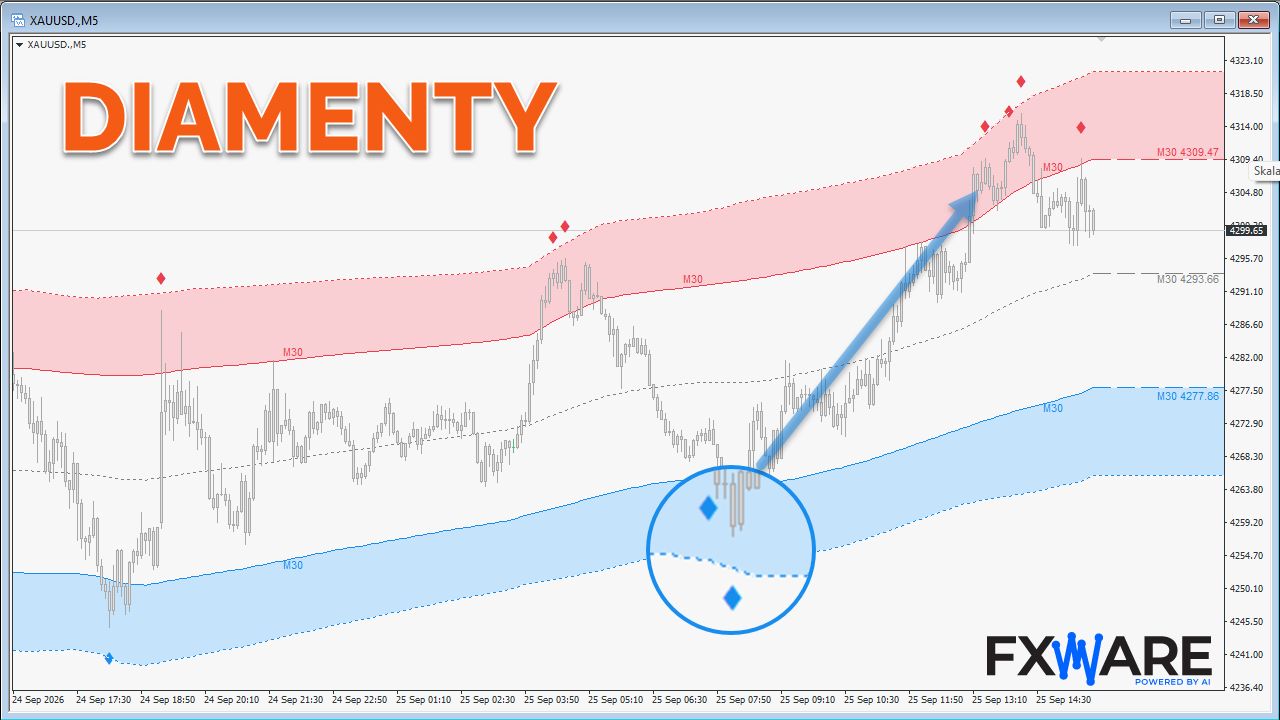
Zauważ, kiedy cena wychodzi poza kanał
Kanał daje punkt odniesienia dla ruchu ceny, a strefy pomagają dostrzec wyjście poza jego podstawowy zakres. Poziomy kanału i interwał obliczeń widzisz przy wykresie, więc możesz najpierw ocenić położenie ceny, a potem przyjrzeć się oznaczeniom sygnałów.
Dwa sposoby obserwacji ruchu poza kanałem
Tryb sygnałów zmienia to, które zdarzenia wskaźnik oznacza na wykresie.
Diamonds
Wybierz je, gdy chcesz widzieć wyjście ceny poza kanał oraz kolejne nowe ekstrema po tej samej stronie.
Arrows
Wybierz je, gdy obserwujesz wybicie i następującą po nim świecę przeciwną.
Szerszy kontekst bez przełączania wykresu
Pracujesz na bieżącym wykresie, ale chcesz mieć odniesienie do kanału z wyższego interwału? Wskaźnik może dobrać interwał bazowy automatycznie albo skorzystać z ustawienia ręcznego. Na przykład na wykresie M15 możesz obserwować kanał liczony z H1. Etykieta przy kanale przypomina, z jakiego interwału pochodzą obliczenia.
Enter the required information on the chart
Jeśli na jednym wykresie śledzisz kilka elementów, nadmiar oznaczeń utrudnia odczyt. Możesz wyłączyć wypełnienie stref, etykiety cen kanału lub oznaczenie interwału i skupić się na informacjach potrzebnych w danej analizie.
Sprawdź ustawienia i dostępność
Otwórz instrukcję, żeby poznać ustawienia interwału i oba sposoby oznaczania sygnałów. Aktualną ofertę znajdziesz w sklepie.